Introduction
For years, organizations have done what seemed natural: spin up big, heavy-weight backend servers to handle custom authentication logic. EC2 instances, container clusters, virtual machines… maybe even a lovingly hand-fed monolith stacked away in a datacenter somewhere.
But here’s the thing - when we're lding a centralized authentication system using a managed identity provider like AWS Cognito (or any cloud-native auth service), standing up a whole backend to expose various auth API's might be an over kill.
It can quickly become:
- Over-engineered
- Complex to maintain
- Hard to scale
💸 And eventually more expensive than it needs to be.
Exploring the serverless option:
Instead of managing infrastructure, we can deploy lightweight, custom authentication APIs as Lambda functions, wrapped behind API Gateway. It’s less tedious to maintain, more flexible to evolve, and performs beautifully - especially when no one's logged in for 3 days straight.
Also:
- Need to pay only when the auth API is actually used
- Scale from 1 user to 1 million without lifting a finger
- And the backend goes to sleep when our users do
In this post, we’ll explore how to bring this pattern to life - combining Cognito, Lambda, and API Gateway to build a centralized auth solution that’s fast, secure, and doesn’t require an ops team on speed dial.
Let’s build it. No servers, no stress. ✨
The Solution Overview & Architecture
It's actually not that hard, we replace “always-on infrastructure” with “just-in-time (JIT) execution.” That’s right - our backend only wakes up when a request comes in, handles it like a pro, and goes right back to sleep.
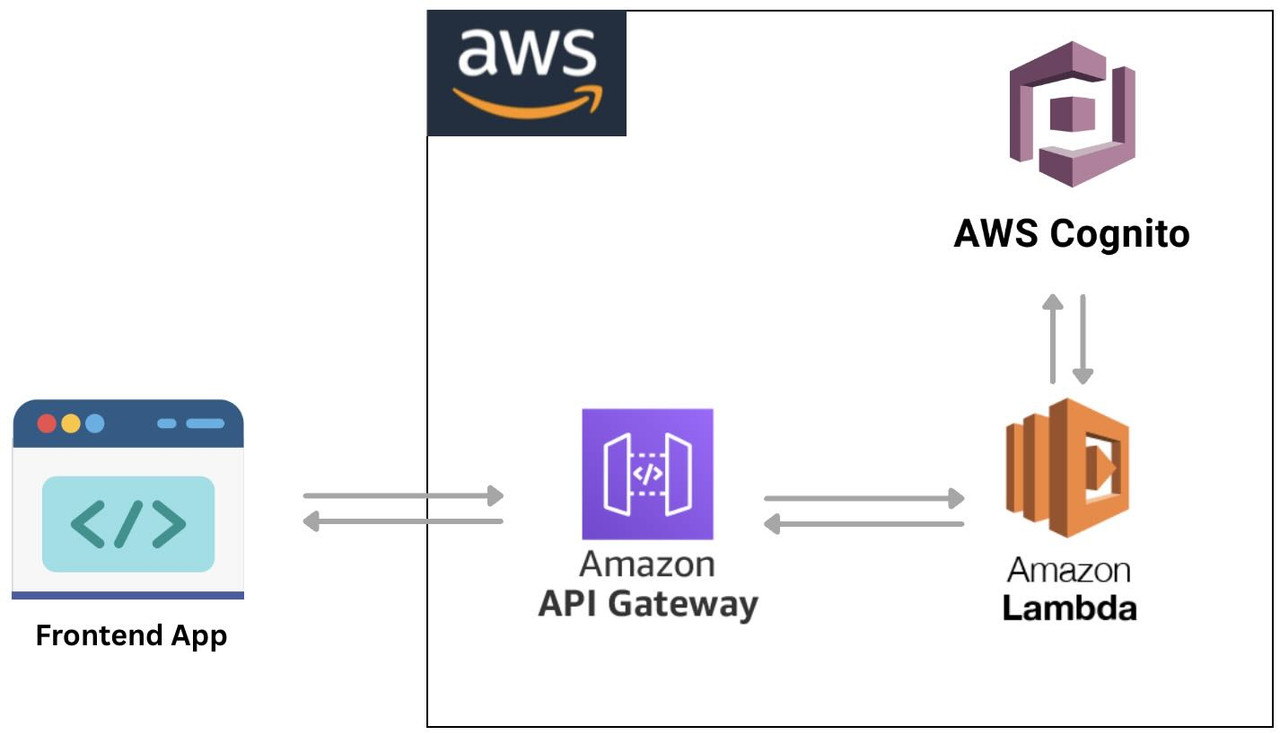
Here’s the high-level flow:
- A frontend App hitting one of our custom endpoints:
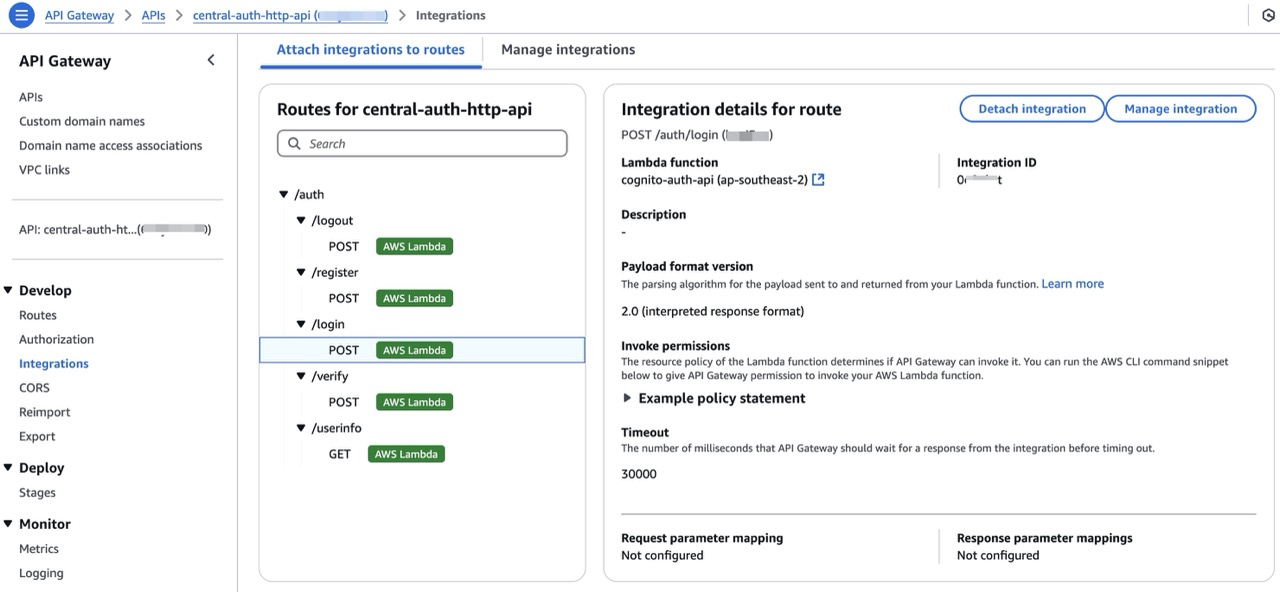
- /auth/register to sign up a user
- /auth/login to authenticate
- /auth/verify to confirm a code
- /auth/userinfo or /auth/logout as needed
-
These requests go through API Gateway, which acts as a digital assistant - routing each request to the correct AWS Lambda function.
-
Inside Lambda, we use the AWS SDK (v3) to securely talk to Amazon Cognito, calling APIs like
SignUpCommand,AdminInitiateAuthCommand,ConfirmSignUpCommand, etc. -
Cognito does the heavy lifting: managing user pools, verifying credentials, issuing JWTs (access and ID tokens), and handling Multi-Factor Authentication (MFA).
-
Lambda formats the response and sends it back to the client - typically including tokens, error messages, or verification steps.
Additionally, all the users can be stored in a central Cognito user pool, allowing for org-wide Single Sign-On (SSO) across multiple apps and services.
Architecture Diagram
Here’s what the flow looks like:
Serverless for Auth APIs - Why It’s a Perfect Fit
When it comes to authentication, the requirements are simple - but non-negotiable. The solution has to be secure, fast, scalable and cost-effective. That’s exactly where serverless architecture shines - especially for something as request-driven as authentication.
Let’s break it down:
No Backend Infra to Manage
With serverless, we skip the servers, load balancers, act of patching and maintenance and keeping track of Scaling rules and alarms. There's no instance to SSH into, no "oops the server crashed", and no complex deployment pipelines to juggle.
Scales Automatically
One user or one million - it doesn’t matter.
AWS Lambda automatically scales the auth API with zero effort. Whether 3 people are logging in or 30,000 people are registering simultaneously after the product goes viral — this serverless backend won’t flinch.
Pay Only When Used
This is one of the most underrated benefits of serverless for auth:
You don’t pay when no one’s logging in.
Lambda charges based on invocation and execution time. If no one’s using the system, the costs are essentially zero. For bursty workloads like auth (which spike at login and remain idle otherwise), this is the right choice!
Seamless Integration with Cognito
Lambda plays really nicely with AWS Cognito. Using the AWS SDK inside the function, we can:
- Register users
- Confirm email/phone numbers
- Handle MFA
- Generate JWT tokens
- Fetch user attributes
- Log users in & out
All without exposing any Cognito config or secrets to the frontend.
Easy to Deploy & Iterate
Operator can deploy a Lambda function by:
- Uploading a
.zipfile (manual but effective) - Using a CI/CD pipeline
- Leveraging Infrastructure as Code (like CDK, Terraform, SAM)
Either way, the solution can go from “idea” to “live auth API” in under 30 minutes - and iterate quickly without redeploying the whole system.
API Design & Endpoints
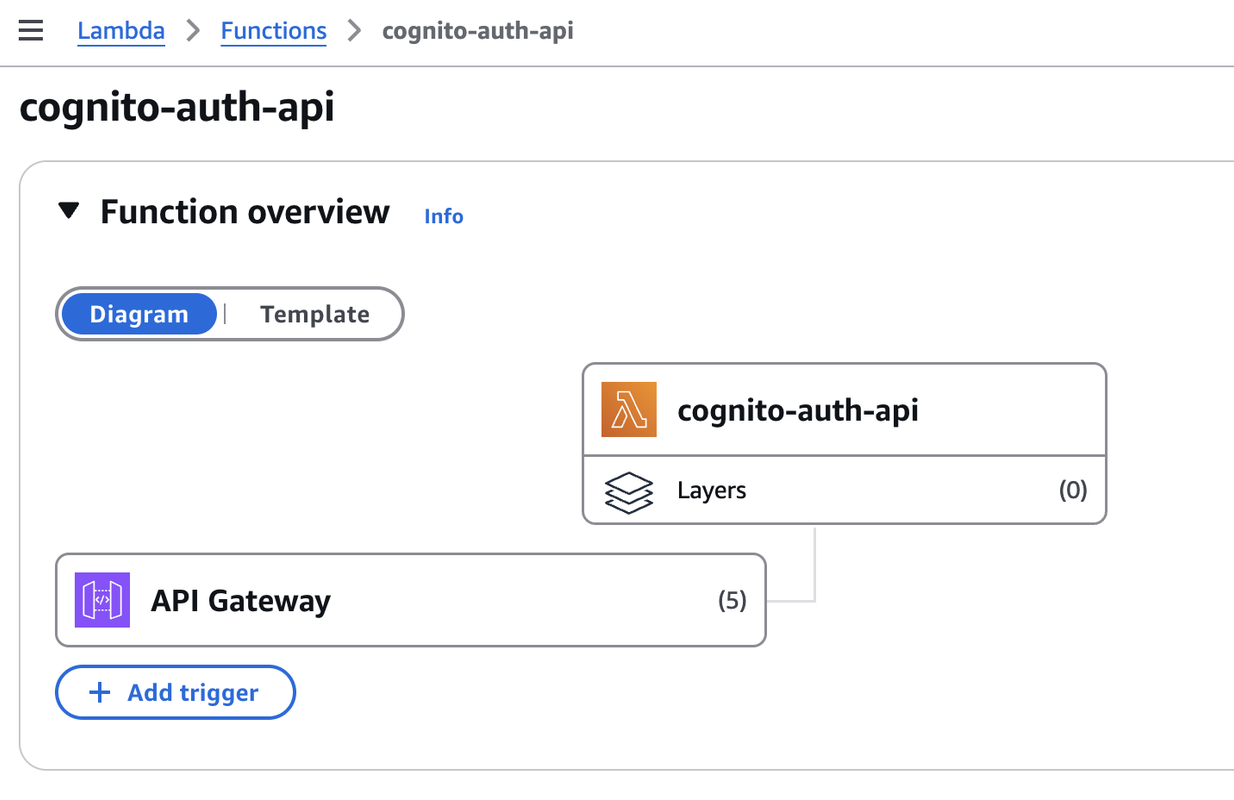
The beauty of this solution is that it feels like any other custom-built auth API — but under the hood, it’s powered by Lambda functions instead of servers. Each endpoint represents a specific Lambda function (or a shared handler), and API Gateway routes the requests like an agent who never sleeps.
- All requests are handled by individual Lambda functions or routed internally via a single auth.js router.
- We can build this as a monolithic Lambda (
lambda-server.js) or split by various endpoints. - Environment variables securely store sensitive data like Cognito user pool ID and client credentials.
Cognito & Lambda: Integration Highlights
Here’s how we securely integrate AWS Cognito into Lambda using the AWS SDK v3 - giving us full programmatic control over user sign-up, login, and verification flows. In our Lambda functions, we use the modular and tree-shakeable AWS SDK v3 - specifically the Cognito Identity Provider client:
npm install @aws-sdk/client-cognito-identity-provider
Then in the Lambda handler (or shared service file), we can use it as mentioned below:
import {
  CognitoIdentityProviderClient,
  SignUpCommand,
  AdminInitiateAuthCommand,
  ConfirmSignUpCommand,
  GetUserCommand,
  GlobalSignOutCommand,
} from "@aws-sdk/client-cognito-identity-provider";

const client = new CognitoIdentityProviderClient({
  region: process.env.AWS_REGION,
});
✅ This client allows Lambda to securely communicate with Cognito’s user pool.
Securing Config with Environment Variables
Keep the secrets... secret. Hardcoding App Client IDs or secrets is a big no-no. Instead, configure your Lambda function like this:
| Env Variable | Purpose |
|---|---|
| COGNITO_USER_POOL_ID | The ID of your Cognito user pool |
| COGNITO_APP_CLIENT_ID | The App Client ID used by your frontend |
| COGNITO_APP_CLIENT_SECRET | (Optional) App Client Secret, if enabled |
| AWS_REGION | The region where Cognito is hosted |
| CORS_ORIGIN | The domain for your CORS configuration |
IAM Permissions for Lambda to Call Cognito
The Lambda function would need permissions to access Cognito APIs.
✅ Example IAM policy:
{
  "Effect": "Allow",
  "Action": [
    "cognito-idp:SignUp",
    "cognito-idp:AdminInitiateAuth",
    "cognito-idp:ConfirmSignUp",
    "cognito-idp:GetUser",
    "cognito-idp:GlobalSignOut"
  ],
  "Resource": "arn:aws:cognito-idp:<region>:<account-id>:userpool/<user-pool-id>"
}
Attach this policy to the Lambda function's execution role and we're good to go.
Security & Cost Considerations
Serverless might sound like magic — and it sort of is — but as with any system, security and cost are two things you should never take for granted.
Here’s how we make sure our Lambda-based authentication system stays secure, cost-effective, and production-ready.
Use Least-Privilege Roles (Always)
Each Lambda function runs under an IAM execution role. This role defines what that function is allowed to do in AWS.
Operator's job: give it only what it needs. Nothing more.
For example, if a Lambda only needs to confirm a user’s sign-up, then this is sufficient:
{
  "Effect": "Allow",
  "Action": ["cognito-idp:ConfirmSignUp"],
  "Resource": "arn:aws:cognito-idp:<region>:<account>:userpool/<user-pool-id>"
}
💡 Avoid wildcards like
Action: "*"orResource: "*"- even if it's "just testing".
API Gateway: Protect the Edge
API Gateway acts as the front door to the Lambda-powered auth system, so securing it is crucial.
Here are a few must-haves:
✅ CORS (Cross-Origin Resource Sharing) If the frontend is hosted on a different domain (e.g., S3 or CloudFront), we need to enable CORS so your frontend can talk to the API.
Example CORS headers to add in Lambda responses:
Access-Control-Allow-Origin: https://your-frontend-domain.com
Access-Control-Allow-Headers: Content-Type, Authorization
Access-Control-Allow-Methods: GET, POST, OPTIONS
Or configure it directly in API Gateway for HTTP APIs.
Throttling & Rate Limits
By default, API Gateway allows a lot of requests. it's good to configure throttling to avoid abuse:
-
Default limits: 10,000 RPS (region-wide)
-
Set usage plans or configure custom limits:
- E.g., 100 requests per minute per IP
- Protects from brute-force login attempts
we can also integrate WAF (Web Application Firewall) to block malicious patterns and IPs.
Pay-Per-Use Pricing
The best part of this setup? we only pay when the API is actually used.
Here’s what that looks like:
-
Lambda
- Free tier: 1M requests & 400,000 GB-seconds/month
- After that: ~$0.20 per 1M requests
-
API Gateway (HTTP API)
- $1.00 per 1M requests (much cheaper than REST API mode)
For a small auth workload (e.g. <100k monthly logins), the entire auth backend might cost less than a cup of coffee ☕.
Optional: Use API Gateway Caching
For non-sensitive endpoints like /auth/userinfo, we can enable response caching at the API Gateway level to get a performance boost.
- Improves speed
- Reduces Lambda invocations
- Useful for metadata or static public endpoints
Note
Sample Code Repository
You can find the complete implementation in the GitHub repository:
👉 https://github.com/rajks24/cognito-auth-api
cognito-auth-api/
├── app.js                  # Main entry point of the application
├── deployment.zip          # Deployment package for AWS Lambda
├── lambda.js               # AWS Lambda handler for the application
├── package.json            # Project metadata and dependencies
├── routes                  # Directory for route definitions
│   └── auth.js             # Routes for authentication-related endpoints
└── services                # Directory for service logic
    └── cognitoService.js   # Service for interacting with AWS Cognito
This repository contains a Node.js based serverless authentication API designed to run on AWS Lambda and integrate with AWS Cognito.
It includes:
- Custom authentication endpoints: /register, /verify, /login, /userinfo, /logout
- Lambda-compatible code using serverless-http and Express-style routing
- Environment-based configuration for region, user pool, and app client secrets
- CORS support for secure frontend integration
- Instructions for both local development and Lambda-based deployment in README.md
How to Use It
- Use
app.jsto run the app locally (e.g., node app.js) for development or testing. - Use
lambda.jswhen deploying to AWS Lambda — it exports the same routes in a Lambda-compatible format using serverless-http. deployment.zipis ready to be uploaded directly to Lambda.- The
cognitoService.jsfile contains all the logic for interacting with Cognito (e.g., sign-up, login, verification, token-based userinfo, logout) via the AWS SDK v3.
Testing the API locally is as simple as running node app.js and hitting the endpoints with a tool like Postman or curl.
curl -X POST https://your-api-id.amazonaws.com/auth/register \
  -H "Content-Type: application/json" \
  -d '{"email": "[email protected]", "password": "YourStrongPassword123!"}'
Conclusion & Final Thoughts
What we just built is a lean, secure, and highly scalable authentication system using nothing more than AWS Cognito, Lambda, and API Gateway — all without deploying a single traditional server.
For many teams, this pattern is a game-changer as it offers:
- ✅ No backend maintenance
- ✅ Pay-as-you-go pricing
- ✅ Clean separation of frontend and backend concerns
- ✅ Full flexibility to build custom auth flows on top of Cognito
It’s a solution that works just as well for a weekend MVP as it does for a large-scale enterprise platform.
But Wait… There's More (May be in another blog 😅)
To keep this post focused and digestible, I didn’t dive into all the extras - but there are several production-critical enhancements worth considering before going live:
- 🔐 Multi-Factor Authentication (MFA): Add SMS/OTP-based 2FA for improved account security.
- 📧 Custom email/phone verification workflows: Handle edge cases like expired codes or resend logic.
- ☁️ Federated login: Integrate with providers like Google, Microsoft Entra (Azure AD), or even SAML IdPs.
- 🔁 Token refresh workflows: Manage refresh_token lifecycle securely in frontend and backend.
- 📊 Monitoring and logging: Enable CloudWatch logs and set up alarms for unusual auth activity.
- 🧾 Audit trails and compliance: Think GDPR, HIPAA, and audit logs if you're in regulated environments.
- 🛡️ Rate limiting, WAF, and abuse protection: Defend your API gateway from brute-force attempts.
Each of these enhancements can be added incrementally, as needed, to make the auth system more robust and production-ready. Thanks for reading! I hope this gave you a clear, practical path for building and scaling custom authentication workflows — without having to maintain a single backend server.
Got questions or ideas? Or building something similar? Let’s connect on Comment, GitHub or LinkedIn. 👋
Until next time — stay stateless, stay secure! 🙂